
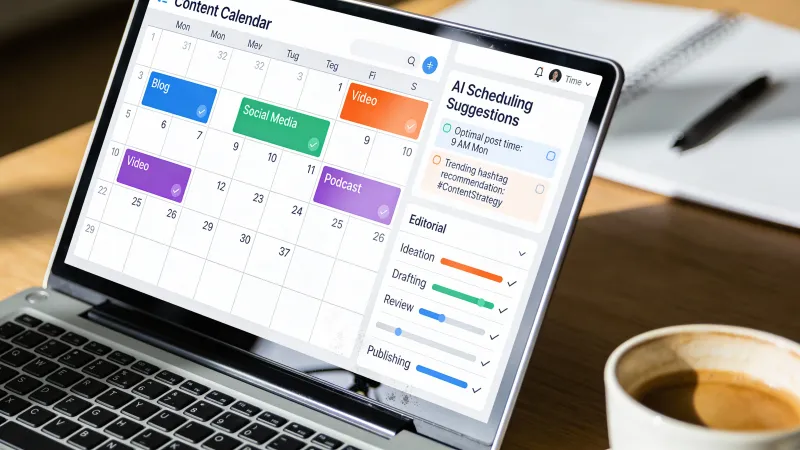
Content calendars break in predictable ways.
You start with ambitious plans. Three posts a week. Consistent themes. Strategic timing. Six weeks later, you’re scrambling to publish something, anything, because the calendar became a graveyard of half-formed ideas and missed deadlines.
This happens because traditional content calendars are built backward, starting with empty slots you need to fill rather than ideas worth pursuing that need homes. AI changes that equation, but not in the ways most people expect.
The Planning Problem
Content planning traditionally consumed 30-40% of marketing teams’ bandwidth. Much of that time went to logistics: what publishes when, who creates what, which topics fit which channels. Strategic thinking got squeezed into whatever time remained.
AI tools promise efficiency gains. The reality is more nuanced. Content calendar automation with AI creates improvement in efficiency while maintaining strategic alignment, but only when implementation addresses the actual bottlenecks, not just the obvious ones.
The obvious bottleneck is ideation. Coming up with topics feels hard. But most teams have plenty of topic ideas sitting in documents, Slack threads, and meeting notes. The real bottleneck is evaluation, organization, and commitment. Deciding what’s worth doing, in what order, with what resources.
AI helps with both, but the second matters more.
Topic Ideation at Scale
Let’s start with ideation anyway, because it’s where everyone starts.
Traditional brainstorming produces maybe a dozen ideas per session, if the session goes well. AI produces hundreds in minutes. That sounds like progress. It’s actually a problem if you don’t have a system for filtering.
The goal isn’t maximum ideas. It’s maximum good ideas per hour of total effort, including evaluation time.
The Constraint-First Method
Instead of asking AI for general topic ideas, start with constraints.
“Give me 20 blog post ideas” produces generic results. “Give me 10 blog post ideas for B2B SaaS marketers struggling to prove ROI on content, focusing on problems they face in the first 90 days of a new content program” produces specific, actionable suggestions.
Constraints make AI smarter. Audience constraints, format constraints, timing constraints, competitive constraints. The tighter the box, the more creative the output within it.
Build your prompts around:
- Who specifically needs this content
- What problem or question they’re trying to solve
- What format best serves their situation
- What angle hasn’t been covered
- What you can add that others can’t
Ideation Sprints vs. Continuous Generation
Some teams run quarterly ideation sprints. Two hours, focused effort, enough ideas for three months. Others generate continuously, capturing ideas as they arise and letting AI expand on them weekly.
Both work. The sprint approach creates focus and forces prioritization. The continuous approach captures more spontaneous ideas but requires more discipline in evaluation. Choose based on your team’s habits, not aspirations.
Turning Ideas Into Plans
Raw ideas need development before they become calendar entries. For each promising topic, capture:
- The specific angle you’ll take
- Why this is different from existing content
- Who the target audience is
- What success looks like
- Rough resource estimate
AI can help draft these elements. Ask it to suggest three angles for a topic, identify the strongest, develop an outline. But you make the final calls. The calendar reflects your strategy, not AI’s suggestions.
Scheduling and Timing
When to publish matters, but probably less than you think.
Optimal posting times vary by platform, audience, and content type. AI tools analyze your historical data to identify patterns, and the analysis is useful. But the patterns tend to cluster around predictable windows: morning commutes, lunch breaks, evening browsing, with variations of an hour or two.
The bigger scheduling question is sequencing. How do topics build on each other? What needs to publish before what? Which pieces are evergreen versus timely?
Strategic Sequencing
A content calendar isn’t just a schedule. It’s a narrative. What story does your content tell over a quarter? Over a year?
Consider:
- Pillar content and supporting pieces (the main topic and variations)
- Seasonal relevance (industry events, annual cycles, holidays)
- Funnel progression (awareness content leading to consideration content leading to decision content)
- Campaign alignment (content that supports specific initiatives)
AI can help map these relationships. Describe your pillar content and ask for supporting topic suggestions. Describe your campaign timeline and ask what content serves each phase. The connections aren’t always obvious until you map them.
Capacity Planning
Ideas are cheap. Execution is expensive.
A realistic content calendar accounts for production capacity. How many pieces can your team actually produce per week at acceptable quality? What’s the mix of quick pieces versus resource-intensive ones?
AI helps with estimation. Describe a content piece and ask for a rough production timeline. What research is needed? How complex is the topic? What assets does it require? The estimates won’t be perfect, but they’re better than guessing.
Build buffer into the calendar. Content always takes longer than expected. Illness, competing priorities, and creative blocks are predictable in aggregate, even if unpredictable in specifics. A calendar at 80% capacity survives reality better than one at 100%.
Content Mix Planning
Variety matters. The same type of content, repeated endlessly, fatigues your audience and your team.
Format Diversity
Mix formats deliberately:
- Long-form guides and how-tos
- Short-form opinions and observations
- Visual content and infographics
- Case studies and examples
- Curated and aggregated content
- Interactive and tool-based content
Each format serves different audience needs and requires different production resources. A calendar heavy on long-form guides strains writing capacity. A calendar heavy on quick takes lacks depth. The right mix depends on your audience and capabilities.
AI can suggest format variations for any topic. “I want to cover email marketing automation. What formats would serve different audience needs?” You might get suggestions ranging from a comprehensive guide to a quick checklist to a comparison of tools to a case study template. Pick what fits your capacity and strategy.
Theme Balance
Content needs thematic coherence without monotony.
Too narrow: every post about the exact same topic Too broad: posts scattered across unrelated subjects Just right: related topics that build a comprehensive picture
Map your content themes. Are you covering your subject matter thoroughly? Are there gaps? Are some areas overcovered while others are neglected?
AI excels at gap analysis. Feed it your recent content list and ask what’s missing. What questions does your audience have that you haven’t addressed? What topics have you covered extensively versus briefly?
Maintaining Consistency
The calendar exists. The ideas are scheduled. Now comes the hard part: actually doing it.
Content consistency fails for predictable reasons. Unclear ownership. Competing priorities. Quality ambiguity. Scope creep. AI can address some of these, but not all.
What AI Handles
AI reduces friction in content production. First drafts come faster. Research takes less time. Outlines emerge from conversations rather than blank pages. This accumulated speed creates slack in the schedule, room to absorb delays without derailing the calendar.
AI also helps maintain voice consistency across different authors and pieces. Describe your brand voice, feed it examples of content that nails the tone, and use AI to review drafts against that standard. Consistency doesn’t require a single author; it requires a shared understanding of what good looks like.
As one Hacker News user, breck, put it: “This generated a number of really good ideas for me. I won’t be using any of the AI generated content, but I WILL use some of these ideas!” That’s the right mental model. AI generates raw material; you shape it into something worth publishing.
What AI Doesn’t Handle
Motivation. Commitment. Priority conflicts. The fundamental challenges of consistent content production aren’t mechanical. They’re organizational and psychological.
A content calendar only works if someone is accountable for making it work. That usually means a single owner with authority to enforce deadlines and adjust plans. AI can’t do that.
The calendar also needs flexibility. Rigid plans break against reality. Build in mechanisms for adjustment: monthly reviews, swap slots for timely content, clear criteria for when to skip versus when to push through.
The Automation Skeptics
Not everyone is convinced AI should drive content processes. On Hacker News, elmerfud responded to an AI content scheduling tool with this: “My question back to you would be, will the content look like it’s been written and posted by an AI? When I see AI doing creative works it seems incredibly obvious to me and strikes me as incredibly lazy.”
That’s a valid concern. AI-generated content can feel hollow. The solution isn’t avoiding AI; it’s using it correctly. Ideation, research, drafts, scheduling. Human judgment on strategy, voice, and final execution. The calendar plans the work. People do the work that matters.
Building Your System
Here’s a practical approach to AI-assisted content calendar creation.
Monthly: Strategic Planning
Once per month, step back. Review performance. Identify themes for the coming period. Set capacity expectations.
Use AI to:
- Analyze what performed well and why
- Suggest themes aligned with your goals
- Identify gaps in recent coverage
- Generate initial topic ideas for each theme
Weekly: Tactical Planning
Each week, translate strategy into action. Assign ownership. Clarify requirements. Adjust for reality.
Use AI to:
- Develop outlines for upcoming pieces
- Suggest angles and approaches
- Research supporting information
- Draft initial versions for review
Daily: Execution Support
Day to day, AI accelerates production. Writing assistance, editing help, format adaptation.
Use AI to:
- Draft and revise content
- Adapt content across platforms
- Maintain voice consistency
- Handle routine formatting and optimization
Quarterly: System Review
Every quarter, evaluate the system itself. What’s working? What isn’t? Where does AI help most? Where does it create problems?
Adjust your prompts, your workflows, your expectations. The technology improves constantly; your processes should too.
The Tools Question
People always ask about tools. The honest answer: the specific tool matters less than how you use it.
Reddit users discussing scheduling assistants highlight practical factors. TB_lawkid13 called Skedpal “such a game changer” for task scheduling. No_Scarcity2111 praised Motion’s automatic scheduler, noting that “the auto moving of unfinished tasks to a different date if you haven’t completed them is a game changer.”
The pattern: tools that adapt to reality rather than demanding reality adapt to them. Your content calendar tool should reschedule when needed, surface conflicts before they become problems, and integrate with how you actually work.
Whether that’s a dedicated content calendar platform, a project management tool with calendar views, or a well-organized spreadsheet with AI assistance depends on your team size, budget, and existing workflows. The principles remain constant regardless of implementation.
When Calendars Fail
Sometimes the calendar isn’t the problem.
If you consistently can’t hit your calendar targets, the issue might be:
- Unrealistic volume expectations
- Unclear quality standards leading to endless revision
- Insufficient research leading to shallow content
- Misalignment between content goals and business goals
- Simple understaffing
No amount of AI assistance fixes these structural problems. Before optimizing your calendar process, make sure you’re trying to solve the right problem.
The Deeper Question
Content calendars are ultimately about making promises and keeping them. Promises to your audience that valuable content will appear regularly. Promises to your team that work is planned and prioritized. Promises to your business that content serves strategic goals.
AI makes those promises easier to keep by accelerating the work, surfacing insights, and reducing friction in collaboration. But the promises themselves remain human. What you commit to, why you commit to it, and whether you follow through are decisions no algorithm can make for you.
The best content calendars balance ambition with realism, structure with flexibility, and efficiency with quality. AI helps with the efficiency. The rest is still on you.
For help with specific content types, see AI Content Ideation Techniques for topic generation and AI Blog Writing Workflow for the production process.



